Find-replace text in dimension names using SOLIDWORKS API

More 'Goodies'
This macro finds and replaces the text in the dimension names of the selected feature or features (similar to Find-Replace feature in text editors) using SOLIDWORKS API:
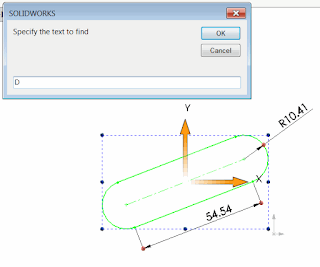
- Open SOLIDWORKS assembly or part
- Select features to lookup dimensions in
- Run the macro
- Specify the text to find and the text to replace. Only include short dimension name. For example the dimension D1 in Sketch1 will have a short name D1 and full name D1@Sketch1. Specifying D in find field and B in replace field will result in dimension to be renamed to B1@Sketch1.
Dim swApp As SldWorks.SldWorks
Dim swModel As SldWorks.ModelDoc2
Dim swSelMgr As SldWorks.SelectionMgr

Sub main()

    Set swApp = Application.SldWorks

    Set swModel = swApp.ActiveDoc

    Set swSelMgr = swModel.SelectionManager

    If Not swModel Is Nothing Then

        Dim fromText As String
        Dim toText As String

        fromText = InputBox("Specify the text to find")
        toText = InputBox("Specify the text to replace")

        Dim i As Integer
        Dim isFeatSelected As Boolean
        isFeatSelected = False

        For i = 1 To swSelMgr.GetSelectedObjectCount2(-1)

            Dim swFeat As SldWorks.Feature

            Set swFeat = swSelMgr.GetSelectedObject6(i, -1)

            If Not swFeat Is Nothing Then

                isFeatSelected = True

                Dim swDispDim As SldWorks.DisplayDimension
                Set swDispDim = swFeat.GetFirstDisplayDimension

                While Not swDispDim Is Nothing

                    Dim swDim As SldWorks.Dimension
                    Set swDim = swDispDim.GetDimension2(0)

                    swDim.Name = Replace(swDim.Name, fromText, toText)

                    Set swDispDim = swFeat.GetNextDisplayDimension(swDispDim)

                Wend

            End If

        Next

        If Not isFeatSelected Then
            MsgBox "Please select feature(s) you want to rename dimensions in"
        End If

    Else
        MsgBox "Please open the model"
    End If

End Sub